Build a Book Review App with SuperNative and Laravel

A reading journal is a better SuperNative exercise than a static counter because it combines several ordinary app behaviors: three text fields, a rating control, validation, a saved list and local persistence. This tutorial builds Leafnote with Laravel 13 and NativePHP Mobile 4. You can follow the exact source in the Leafnote GitHub repository. It is a separate project from the Focusboard to-do tutorial, and this article is free to read.
The shape of the app
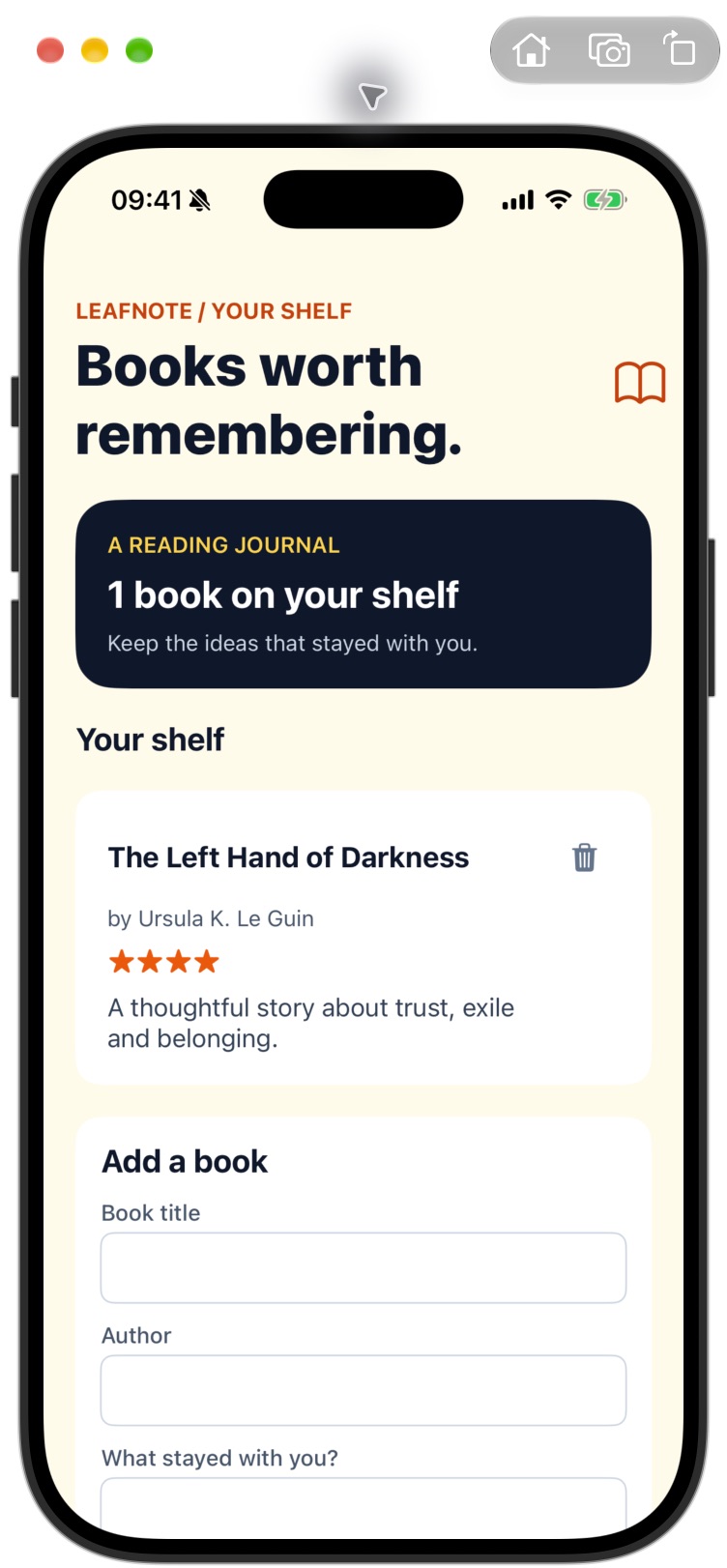
Leafnote has one screen: a reading journal header, a form for a new book and a shelf of saved reviews. A review records a title, author, a few thoughts and a rating from one to five. The data stays in a local SQLite database, so the example runs without an API, login or network connection. On iOS, SuperNative turns its native Blade element tree into SwiftUI controls. The same PHP component holds the form state and responds to taps. This is a real native rendering path, while Laravel still supplies familiar models and migrations.
The demonstration was built and exercised on an iPhone 17 Pro simulator. That establishes the behavior shown here on iOS; it does not establish an Android build, App Store signing or physical-device performance. If you want to ship to either store, build and inspect each target separately. The SuperNative architecture guide explains how the server-rendered native tree is sent to the platform renderer.
Create a clean Laravel project
Install NativePHP Mobile and the first-party mobile UI package. The latter provides the outlined inputs, icons and text elements in this project. No device feature plugin is needed: there is no camera, push notification or in-app purchase behind the review flow. The repository's NativeServiceProvider explicitly registers only the official UI package. On a Mac with the NativePHP requirements installed, these commands prepare the iOS project:
composer create-project laravel/laravel leafnote
cd leafnote
composer require nativephp/mobile nativephp/mobile-ui
php artisan vendor:publish --tag=nativephp-plugins-provider
php artisan native:plugin:register nativephp/mobile-ui
php artisan native:install ios
Give your app a unique NATIVEPHP_APP_ID in .env. An example identifier is included in the repository, but change it to one you control before distribution. The official installation page lists the current Xcode and platform requirements. Keep generated native build files and your local .env out of Git; the repository ignores both.
Store a book review as a model
The books table uses bounded strings for title and author, a text column for the review and an unsigned tiny integer for the rating. The component checks the one-to-five range before changing rating state, while the save path checks required fields and lengths. The form also gives each input a native length limit. The model casts rating to integer so the Blade view does not need to guess whether a database value is numeric or textual.
Schema::create('books', function (Blueprint $table): void {
    $table->id();
    $table->string('title', 160);
    $table->string('author', 120);
    $table->text('review');
    $table->unsignedTinyInteger('rating');
    $table->timestamps();
});
The local SQLite database is created and migrated by NativePHP when the application starts. This matters for a tutorial repo: someone should be able to clone it and build without copying another person's database file. There is no seed data required for normal use. The screenshot shows a sample review that was entered through the actual simulator interface, not preloaded into the app bundle.
Give the component typed, bounded state
The native root route loads Library::class. The component exposes typed public properties for title, author, review, rating, an error message and a form version. Tapping a star calls setRating(int $rating). Tapping Save calls add(), which trims all text, checks required fields, checks limits, creates a Book row and resets the form. Incrementing the form version changes the native keys on the input controls so their displayed values clear after a successful save.
Route::native('/', Library::class);

public function setRating(int $rating): void
{
    if ($rating >= 1 && $rating <= 5) {
        $this->rating = $rating;
    }
}

public function remove(int $id): void
{
    Book::query()->findOrFail($id)->delete();
}
Do not trust the visual star row as validation. A native action can still be called with an unexpected value, so the range check belongs in PHP. The title, author and review also have server-side length checks even though the inputs limit typing. That protects records from non-visual callers and gives a specific error if the data somehow exceeds a field's limit. In a larger multi-user app, these rules would be good candidates for dedicated form requests or shared validation classes; this local component keeps them close to the only save action.
Design for reading as well as entry
The view uses a warm paper background, dark ink text and orange accents. A dark journal card shows the book count, followed by the shelf; the entry form sits below it. Each saved review appears in its own white card with title, author, stars and the actual note. One book reads as “1 book,” while multiple entries use “books.” Those details sound small, but they help the screen feel like a reading journal rather than a default form.
Each outlined input has a descriptive label and a native:model.debounce.750ms binding. The five rating pressables announce what rating they set to a screen reader, and the delete control has a 44-point touch target with a label that names the book. A long title takes flexible row width so the delete action remains reachable. The saved review text is ordinary escaped Blade output; it is not injected as HTML.
<native:outlined-text-input
    ref="title-input"
    label="Book title"
    native:model.debounce.750ms="title"
    max-length="160" />

@for ($star = 1; $star <= 5; $star++)
    <native:pressable
        ref="rating-{{ $star }}"
        @press="setRating({{ $star }})"
        a11y-label="Set rating to {{ $star }} out of 5 stars">
        <native:icon name="star.fill" :size="24" />
    </native:pressable>
@endfor
That snippet is shortened for clarity; the repository has the full styling, error display, keyed inputs and shelf cards. The input binding documentation explains the model modifiers. Debouncing can affect the moment a native field sends its value to PHP, so check the real keyboard flow rather than assuming a passing component test covers every timing case.
Verify behavior in two layers
The PHP feature test enters title, author and review through the NativePHP test harness, taps the fourth star, saves and asserts that the database row has rating four. Another test checks that incomplete input is rejected; a third checks a title that exceeds the declared length. These are fast, deterministic tests for component behavior. They do not draw a screen or exercise a simulator keyboard.
For the visual and interaction check, build with php artisan native:run ios. In the iPhone 17 Pro simulator, enter “The Left Hand of Darkness,” author “Ursula K. Le Guin” and a short review. Set four stars and save. The form clears, the count changes to one book and a four-star card appears on the shelf. The embedded screenshot comes from that run. I also checked the wording after the first save, because “1 books” is exactly the sort of issue a database assertion would miss.
Leafnote is intentionally a create, read and remove example. Editing, cover images, cloud sync and search can come later. If you add editing, decide whether the entry form is reused or whether a separate native screen is clearer. If you add sync, you will need an identity model and a conflict strategy. For this tutorial, the useful lesson is smaller: a Laravel model and typed component can power a native, persistent journal with a real touch interface. Clone the complete source, run the tests, then inspect your own build in a simulator.