Tilly The Coder
Tilly The Coder

Multimedia app · macOS

Freemium

ZXN Studio

Record your screen and shape the finished video in one Mac app.

Free editor; Studio $15.99/month or $159 lifetime (USD).

Visit ZXN Studio
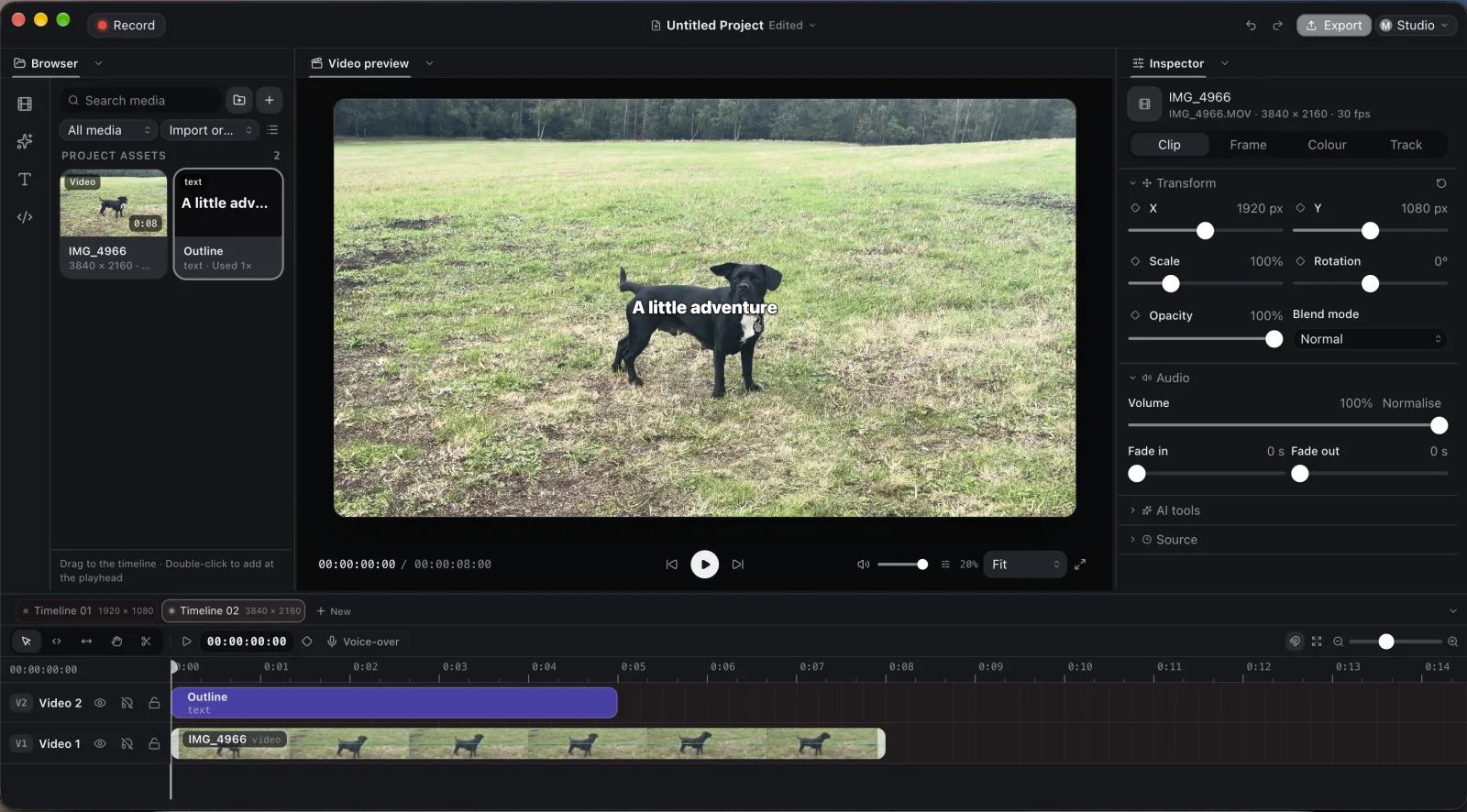
ZXN Studio multi-track Mac video editor with preview and timeline
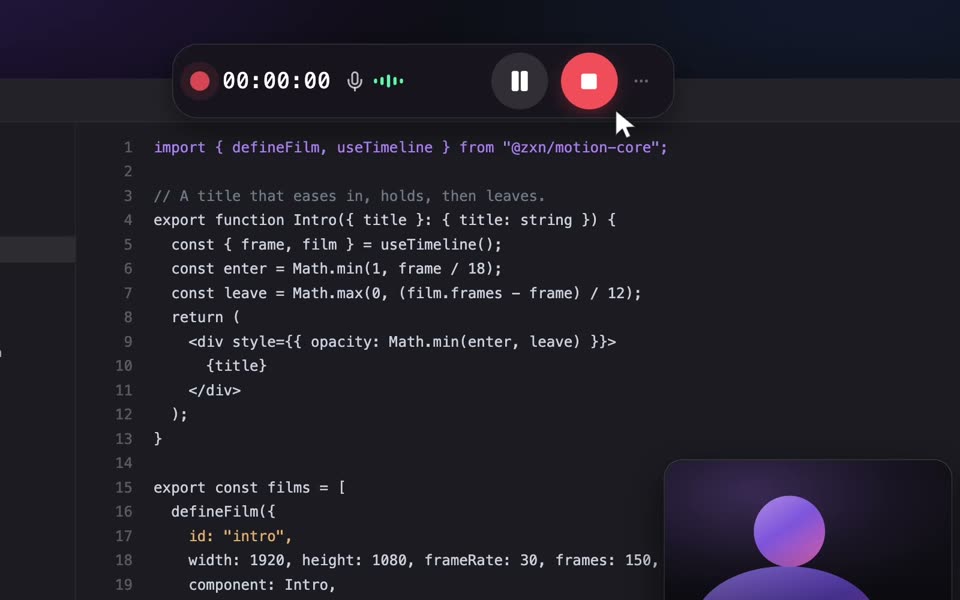
ZXN Studio screen, camera and microphone recording controls
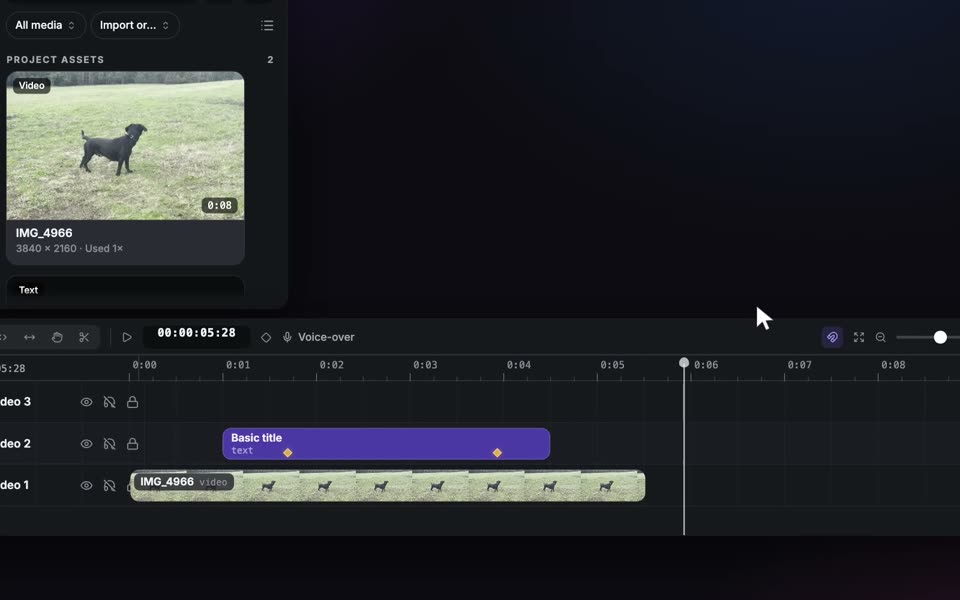
ZXN Studio timeline for clips, titles, audio and transitions

What it does

ZXN Studio is a Mac screen recorder and video editor built around the complete journey from capture to export. Record your screen, camera and microphone in one take. When you stop, the screen and camera arrive as separate, synchronized clips, so you can resize the presenter, cut pauses or change the layout without recording again. The current recorder requires macOS 26 or later; Mac system audio capture is not available yet. The editor gives video, titles and audio their own tracks. Trim and split clips, add transitions, and keyframe position, scale, rotation and opacity. Colour wheels, curves and blend modes help match shots. Local background removal can cut a person out without a green screen while keeping the source clip intact. Studio adds more cut-out models and depth occlusion, which lets titles sit behind a presenter. Processing stays on your Mac. ZXN Motion is for graphics that need more than a title preset. Write an editable composition in TSX, or have an AI agent draft one, then render it frame-exact onto the video timeline. Kinetic typography, animated diagrams and code-led explainers can sit alongside recorded footage and be refined as part of the same edit. The free plan is an ongoing editor, with 1080p at 30 fps exports. Paid Studio unlocks 4K at 60 fps, ProRes and its premium looks and tools.

How ZXN Studio works

Record and edit in one workspace

Capture a Mac screen, camera and microphone together. The camera remains a separate synchronized clip when the take reaches the editor, so a tutorial, demo or bug report can be re-framed during the edit. Mac system audio recording is not available yet.

A multi-track editor with keyframes

Place footage, audio and titles on separate tracks. Trim, split and rearrange clips, then animate position, size, rotation and opacity with keyframes. Use transitions, colour wheels and curves to shape the finished piece.

Remove backgrounds locally

Cut a person out without a green screen using on-device processing. The free plan includes the people model; Studio adds other cut-out models, live removal in the inspector and depth occlusion for graphics behind a presenter. The original clip remains available.

Build motion graphics with ZXN Motion

Create motion compositions in editable TSX and render them frame-exact on the timeline. A developer can author kinetic typography or a code-led explainer directly, and an AI agent can draft a composition for review. This is part of the video workflow, not a separate hosted render service.

Export for tutorials or polished delivery

The free editor exports up to 1080p at 30 fps. Studio raises the ceiling to 4K at 60 fps and adds ProRes masters, more title styles, effects, camera frames, 3D surfaces and motion tracking. MP4, MOV and WebM are available on every plan.

Pricing

Free editor; Studio $15.99/month or $159 lifetime (USD).

Free

$0

An ongoing editor, not a trial: record, edit on a multi-track timeline, remove people backgrounds and export up to 1080p at 30 fps. No account is needed to edit.

See pricing

Studio monthly

$15.99/month

Premium editor tools and looks, all cut-out models, 4K at 60 fps and ProRes. Renews monthly until cancelled.

See pricing

Studio lifetime

$159 once

One payment for lifetime Studio access, with no recurring subscription charge.

See pricing

Prices shown in USD as listed by the product; checkout or the App Store shows the final local price.

Follow Tilly’s project updates

See what I’m building, sharing and improving across my creator channels.

Frequently asked questions

Is ZXN Studio free or a trial?

The free Mac editor does not expire. It supports screen and camera recording, a multi-track timeline, people background removal, and exports up to 1080p at 30 fps. An account is not needed to edit.

What is ZXN Motion?

ZXN Motion lets you write editable TSX motion graphics and render the result frame-exact on the video timeline. You can use it for kinetic type, animated explainers and custom graphics alongside recorded footage.

How much does Studio cost?

The listed US prices are $15.99 per month, renewing until cancelled, or $159 as a one-time lifetime payment. Promotions may change the checkout price; confirm the current total on zxn.studio.

Does ZXN Studio upload my recordings?

Recording, editing and background removal run on your Mac. Optional AI assistance is separate and uses your own account.

Can I remove a background without a green screen?

Yes. The free plan includes local people background removal. Studio adds other cut-out models, live removal and depth occlusion. Review the whole clip and adjust edges if the footage needs it.

What Mac do I need?

The current recorder requires macOS 26 or later. Check the product website for the current full system requirements before downloading.